Varen er på fjernlager, leveringstiden er 5-7 hverdage. Mere info
Leveringsmuligheder - Vælges ved checkout
Instabox - Pakkeboks
39,00
GLS - Pakkeshop
39,00
DAO - Hjemmelevering om natten og i de tidlige morgentimer
Perfekt til arbejdsdage - Levering inden kl. 06:00 - Klar når du vågner
45,00
GLS - Levering til hoveddøren
59,00
Afhentning i vores Pick-up point i Ringsted
19,00
Vis alle leveringsmuligheder (5)
DKK
602,00
ex. moms 481,60
Total inkl. fragt
641,00
Funktionen kræver at man er logget ind. Opret en bruger og brug vores smarte liste system til at holde styr på fremtidige indkøb, faste indkøb eller ønskelister. Opret bruger Login
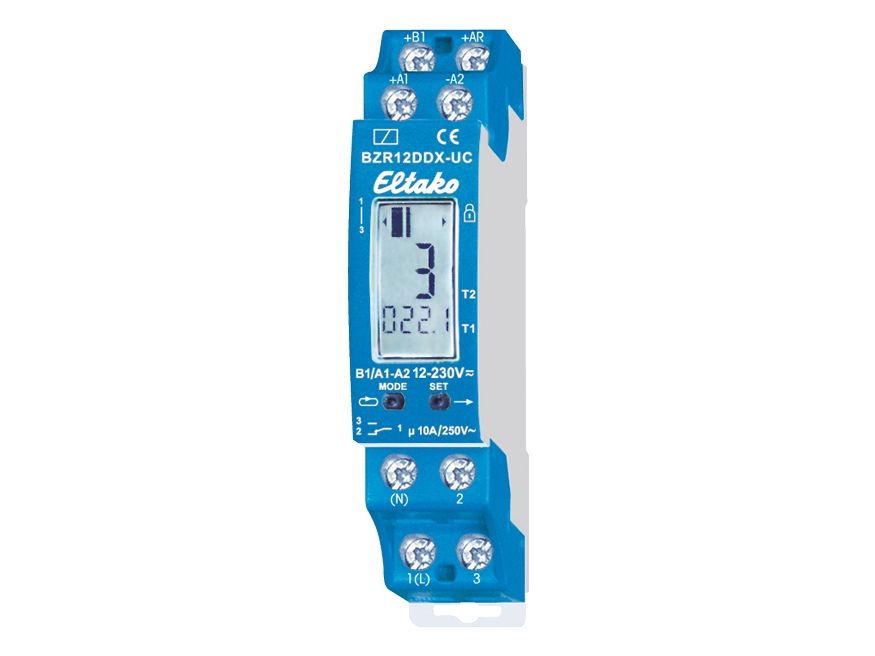
1 CO contact potential free 10A/250V AC. 230V LED lamps up to 200W, incandescent lamp load 2000W. Standby loss 0.05–0.5 watt only. Modular device for DIN-EN 60715 TH35 rail mounting. 1 module = 18mm wide, 58mm deep. With the patented Eltako Duplex technology (DX) the normally potential-free contacts can still switch in zero passage when switching 230V AC 50Hz and therefore drastically reduce wear. Simply connect the neutral conductor to the terminal (N) and L to 1(L) for this. This gives an additional standby consumption of only 0.1 watt. The BZR12DDX is adjustable when the supply voltage 12-230V UC is applied to B1/A2: Select the function by pressing the projecting buttons MODE and SET: Press MODE briefly to make the last function selected (factory setting BST = operating hours counter) flash in field 1. Then press SET to switch between IMP = impulse counter up to 9999 impulses and 10 = impulse counter x 10 up to 99990 impulses. Confirm the selected function by pressing MODE. BST function = operating hours counter. Field 3 shows the accumulated operating hours T1 up to 8760 hours = 1 year. Up to 999.9 hours with one decimal point. Field 2 can display up to 99 accumulated operating years T2. Press MODE to activate the alarm time AZT when the relay contact is switched over from 1-2 to 1-3. AZT flashes and SET increments each time by 1 hour in field 3. Press and hold down to change the time rapidly. Release and then press and hold down again to change the direction. Confirm the selected time by pressing MODE. The + character in field 1 displays the set alarm time. AA flashes and SET activates (display AA+) or deactivates (display AA) the automatic alarm disconnection. The operating hours are counted in field 3 as long as the control voltage (= supply voltage) is applied to A1. The display II moves slowly to the right in field 1. The residual alarm time RZT in hours can be displayed by pressing SET briefly in field 3. Press SET again to switch back to the operation display. If there is a power failure, the contact switches over from 1-2 to 1-3 and may therefore be used for an alarm signal. When the alarm time AZT is reached, the contact switches over from 1-2 to 1-3, SET flashes in field 1 and the display of the elapsed alarm period starts in field 2 from 0.1 minute (m) to 99 hours (h). The contact position 1-3 is indicated by an arrow on the left in field 1. Acknowledge the alarm: a) If the automatic alarm disconnection is activated (AA+), the contact 1-3 closes for only 1 second and the alarm time restarts. b) By connecting the control voltage +B1 to AR the contact switches back, if AR is disconnected from the control voltage the alarm time restarts. c) Press SET for 3 seconds to switch back the contact and to restart the alarm time. The operating hours counter in field 3 continues running same as for a) and b). Reset the operating hours counter previous to the alarm signal by applying the control voltage +B1 to AR for 3 seconds or by pressing the MODE and SET buttons simultaneously for 3 seconds, confirm the RES display in field 1 by pressing SET. The counter is reset to 0. This does not change the alarm time. Enable the keylock by pressing MODE and SET briefly and simultaneously. When you confirm the flashing display LCK by pressing SET, the buttons are locked and this is indicated by an arrow in field 1 pointing in the direction of the lock icon sticker. Disable the keylock by pressing MODE and SET simultaneously for 2 seconds. Confirm the flashing display UNL by pressing SET to unlock. IMP function = impulse counter and function I10 = impulse counter x 10. Field 3 shows the accumulated impulses T1 up to 9999 (99990) impulses. Press MODE to activate the alarm impulse number AIZ when the relay contact switches over from 1-2 to 1-3. AIZ flashes and SET increments each time by 1 impulse in field 3. Press and hold down to change the impulse number rapidly. Release and then press and hold down again to change the direction. Confirm the selected impulse number by pressing MODE and the + character in field 1 to display the set alarm impulse number. Every voltage impulse (identical with the supply voltage) detected at A1 increments the number of counted impulses in field 3. The residual impulse number RIZ can be displayed after pressing SET briefly. RIZ appears in field 1 and the residual impulses until the alarm is displayed in field 3. Press SET again to switch back to the operation display. When the alarm impulse number is reached, the contact switches over from 1-2 to 1-3, SET flashes in field 1 and the display of other impulses up to 99 (990) starts during the alarm signal. The contact position 1-3 is indicated by an arrow on the left in field 1. Acknowledge alarm, Reset and Lock/unlock setting are identical to the BST function = operating hours counter.
Timer type
Daglig timer
Produktfarve
Blå
Skærmtype
Analog
Kode for international beskyttelse (IP)
IP20
Vekselstrømsindgangsspænding
12 V
Vekselstrømsindgangsfrekvens
50 Hz
Bredde
18 mm
Højde
82 mm
Produktet er kendt under følgende varenumre i vores system
EAN:
4010312603161
SKU:
ELT-22001430
Hvorfor oplever jeg at den umiddelbart samme vare findes på forskellige varenumre?
Producenterne udgiver ofte den samme vare med forskellige varenumre, typisk handler det udelukkende om forskellige versioner af emballagen. Eksempelvis kan emballagen være målrettet forskellige lande.
Vi forsøger bedst muligt at samle varerne, men det kan opleves at den samme vare figurerer på forskellige varenumre i vores system.